모두의 프린터 MS 바이러스 오탐지관련 #2
MS의 보안관련 Submission 을 계속 제출하고 있는데요. 그중 결과가 나온게 있어서..
모두의 프린터는 Go라는 언어로 개발되어서 실제로 32비트 64비트를 동일 코드로 컴파일해서 제공하는 프로그램입니다. 동일 코드를 가지고 대상 CPU만 변경해서 빌드를 하는 자동화를 통해 기계적으로 만들어서 배포를 하는 프로그램인데요 ..
보통 제가 모두의 프린터를 배포할때 3개의 파일을 배포합니다.
ebp{버전}_x86.exe
ebp{버전}_x64.exe
ns_ebp{버전}_x64.exe
이렇게 3개의 파일을 보통 배포합니다.
만약 버전에 3.54 버전이면 ebp354_x86.exe, ebp354_x64.exe 같이 32비트 CPU용은 _x86.exe, 64비트 CPU용은 _x64.exe 가 뒤에 붙게 됩니다.
그러면 앞에 ns_ 가 붙는 놈은 뭐냐. ns 버전은 No Signing 버전이라고 64비트 실행파일만 제공을 하고 있구요. NS가 아닌 버전과의 차이점은 일부 사이트 플러그인이 실행중인 실행파일들의 메타정보나 코드사이닝 정보를 가지고 판단해서 모두의 프린터가 실행중이면 죽여버리는 곳들이 있습니다.
메타정보라 하는것은
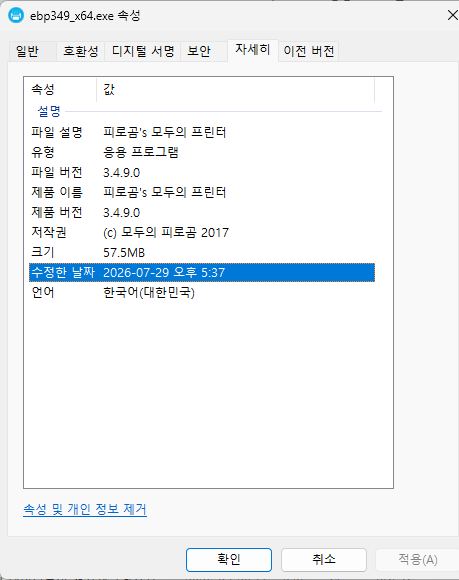
이렇게 실행파일의 속성에 자세히에서 보여지는 파일설명, 제품이름, 저작권, 같은 정보들을 말합니다.
코드 사이닝 정보는 ..
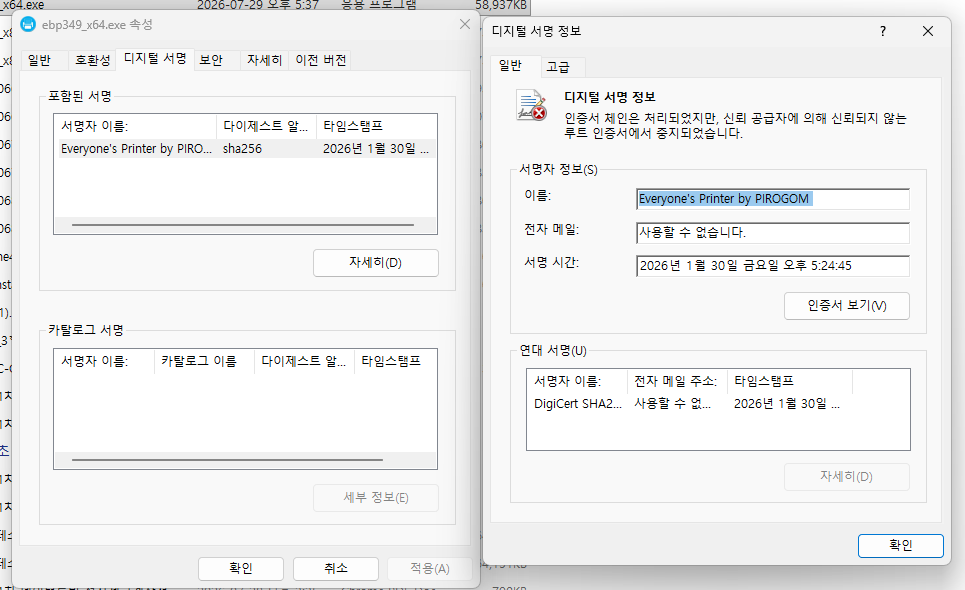
이렇게 인증서로 제가 만든것을 좀더 확실히 알게 하기위해서 서명을 한 서명정보입니다. 단, 보통은 이런 코드사이닝용 인증서를 공인인증기관에서 발급 받아서 공인인증서로 사이닝을 합니다만, 1년마다 갱신해야하고 비용자체도 돈백만원씩 들어가기 때문에 보통 저같은 무료 프로그램 개발자들은 공인인증서는 아니지만 적어도 같은 사람이 만든것임은 증명할 수 있으니 사설인증서를 직접 생성해서 사용을 합니다. 저도 그래서 사설인증서지만 최소한 내가 만들고 서명한 파일이다는 증명가능한 수단으로 사용하고 있습니다.
이러한 정보를 뒤져서 실행중인 프로세스가 모두의 프린터임을 캐치해서 죽여버리는 곳들이 있어서
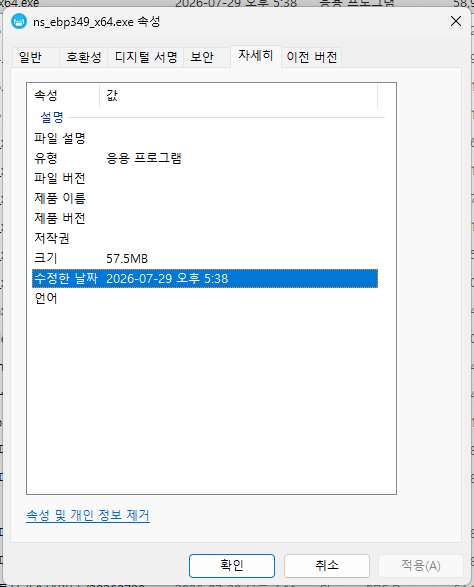
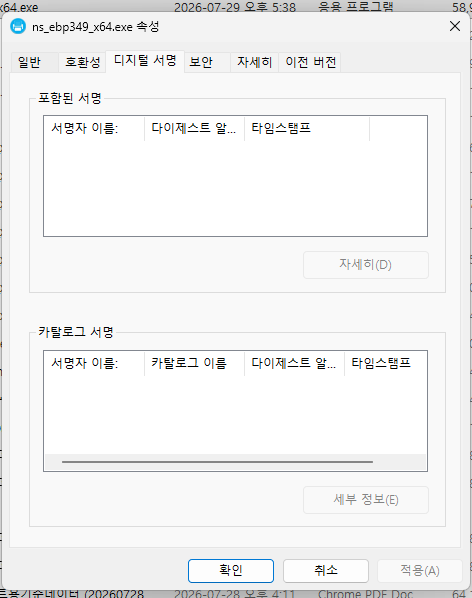
NS버전에는 아에 제조자 정보와 인증서를 통한 코드사이닝 자체를 제거한 버전도 제공중입니다.
실질적으로 일반 64비트용 실행파일과 ns 버전은 메타정보의 유무와 코드사이닝 차이를 제외한 실제 실행파일의 내용은 완전히 동일한 파일입니다. 모두의 프린터의 빌드과정은 실행파일을 만든 뒤에 메타정보를 입히고 -> 코드사이닝을 하기 때문에 ns버전은 그냥 빌드된 파일을 그대로 제공하는 것 뿐입니다.
이러한 상황에서 현재 MS에서 제가 요청한 Submission의 결과를 보는데 .. 좀 애매하네요.
ebp354_x64.exe
Submission ID: 71c6e1c9-6b06-4439-87a0-2611e8abc183
Status: In progress
Submitted by: ******@hotmail.com
Submitted: Jul 29, 2026 오후 1:53:30
User Opinion: Incorrect detection
Analyst comments:
We have determined that the files meet our criteria for malware. At this time the detection will remain in place. More detailed information about the approach and criteria categories currently used by the Microsoft researchers are available here: https://docs.microsoft.com/windows/security/threat-protection/intelligence/criteria Thank you for contacting Microsoft.
아날리스트의 코멘트를 해석하자면.
저희는 해당 파일이 당사의 악성 코드(멀웨어) 기준에 부합하는 것으로 판단했습니다. 따라서 현재로서는 해당 탐지 조치가 그대로 유지됩니다.
현재 Microsoft 연구진이 사용하고 있는 접근 방식 및 기준 범주에 대한 더 자세한 정보는 아래에서 확인하실 수 있습니다. https://docs.microsoft.com/windows/security/threat-protection/intelligence/criteria
Microsoft에 문의해 주셔서 감사합니다.
3.54버전의 64비트 실행파일은 MS기준에서 악성코드(멀웨어)의 기준에 부합을 해서 계속 악성코드로 판단 하겠다는 겁니다.
ebp354_x86.exe
Submission ID: bb9cc462-4fe3-4ca1-a913-d8300c4ee215
Status: In progress
Submitted by: *******@hotmail.com
Submitted: Jul 29, 2026 오후 1:54:45
User Opinion: Incorrect detection
Analyst comments:
Our scanners show no positive detection, and we have no telemetry indicators for the file(s) submitted either. As such, this submission will be closed with no further action pending. If you require further assistance related to this case, you can respond to this email and provide us with additional information related to incorrect detection that will help us troubleshoot the case further. Before proceeding with the next step, we will need to ensure that Microsoft Defender is running the latest Security Intelligence Updates before detection is replicated on the machine, and then providing us with Microsoft Defender diagnostic data from the machine that reported detection: 1. Ensure you have the latest Security Intelligence Update applied to machine before replicating detection - https://www.microsoft.com/en-us/wdsi/defenderupdates 2. Generate and submit Microsoft Defender diagnostic data from the machine reporting the detection: On Windows 11, from elevated command prompt, navigate to directory C:\Program Files\Windows Defender and execute mpcmdrun.exe with option GetFiles: mpcmdrun.exe -GetFiles On Windows 10, from elevated command prompt, navigate to directory c:\Program Files\windows\defender and execute mpcmdrun.exe with option GetFiles: mpcmdrun.exe -GetFiles All created log files will be compressed into MPSupportFiles.cab and saved to folder C:\ProgramData\Microsoft\Windows Defender\Support\ Please upload MPSupportFiles.cab collected as per instructions above through our web portal https://aka.ms/wdsi (select Submissions/Submit a file) and provide notes referencing this submission ID. The investigation will continue once we receive needed diagnostic files. Thank you for contacting Microsoft. Click here for more information
이번엔 동일버전의 32비트용 실행파일을 보겠습니다.
당사의 스캐너에서는 양성(악성) 탐지 결과가 나오지 않았으며, 제출된 파일에 대한 원격 분석 지표도 없습니다. 따라서 본 제출 건은 추가 조치 없이 종결될 예정입니다.
본 건과 관련하여 추가 지원이 필요하신 경우, 이 이메일에 회신하여 오탐지와 관련된 추가 정보를 제공해 주시면 문제를 추가로 해결하는 데 도움이 됩니다. 다음 단계를 진행하기 전에, 탐지된 상황을 기기에서 재현하기에 앞서 Microsoft Defender가 최신 보안 인텔리전스 업데이트로 실행 중인지 확인해야 합니다. 그런 다음 탐지가 보고된 기기에서 수집한 Microsoft Defender 진단 데이터를 당사에 제공해 주셔야 합니다.
- 탐지를 재현하기 전에 기기에 최신 보안 인텔리전스 업데이트가 적용되어 있는지 확인하십시오. - https://www.microsoft.com/en-us/wdsi/defenderupdates
- 탐지가 보고된 기기에서 Microsoft Defender 진단 데이터를 생성하여 제출하십시오.
Windows 11의 경우, 관리자 권한 명령 프롬프트에서
C:\Program Files\Windows Defender디렉터리로 이동한 후 GetFiles 옵션을 사용하여 mpcmdrun.exe를 실행합니다.mpcmdrun.exe -GetFilesWindows 10의 경우, 관리자 권한 명령 프롬프트에서
c:\Program Files\windows\defender디렉터리로 이동한 후 GetFiles 옵션을 사용하여 mpcmdrun.exe를 실행합니다.mpcmdrun.exe -GetFiles생성된 모든 로그 파일은 MPSupportFiles.cab로 압축되어
C:\ProgramData\Microsoft\Windows Defender\Support\폴더에 저장됩니다.위 지침에 따라 수집된 MPSupportFiles.cab 파일을 당사 웹 포털 https://aka.ms/wdsi (Submissions/Submit a file 선택)를 통해 업로드해 주시고, 메모에 이 제출 ID를 명시해 주십시오.
필요한 진단 파일을 수신하는 대로 조사가 계속 진행될 것입니다.
Microsoft에 문의해 주셔서 감사합니다. 더 자세한 정보는 여기를 클릭하세요.
32비트 실행파일에서는 악성코드가 탐지된게 없다합니다?
자 32비트와 64비트는 같은 코드라해도 타겟 CPU가 다르면서 만들어지는 어셈블리 코드에 차이가 있을수 있다 치고. 그럴수 있다 치겠습니다. 뭔가를 계속 변경하고 빌드해서 .. 무엇 때문에 얘들이 오진하는지 제가 코드를 바꿔가며 안걸리게 잘 만들어 봐야하고 계속 Submission 올려서 악성코드 아니다 소리 들을때 까지 지루하게 반복을 해야 하겠지만요 ..
문제는 이겁니다.
제가 앞서서 ns버전은 64비트 바이너리와 메타데이터, 코드사이닝 정보를 제외하고는 차이점이 없다고 말씀 드렸지요. 동일 파일을 가지고 메타데이터를 입히고 코드사이닝만 추가하니까요 메타데이터는 실제 실행 바이너리 영역과 별도의 영역에 저장되고 사이닝 정보도 동일합니다. 실제 실행영역의 바이너리 데이터는 코드사이닝을 하던안하던 메타데이터가 있던 없던 차이가 없습니다.
ns_ebp354_x64.exe
Submission ID: c2da00f3-2738-49b7-8934-f6230270eac3
Status: In progress
Submitted by: ********@hotmail.com
Submitted: Jul 29, 2026 오후 1:55:54
User Opinion: Incorrect detection
Analyst comments:
Our scanners show no positive detection, and we have no telemetry indicators for the file(s) submitted either. As such, this submission will be closed with no further action pending. If you require further assistance related to this case, you can respond to this email and provide us with additional information related to incorrect detection that will help us troubleshoot the case further. Before proceeding with the next step, we will need to ensure that Microsoft Defender is running the latest Security Intelligence Updates before detection is replicated on the machine, and then providing us with Microsoft Defender diagnostic data from the machine that reported detection: 1. Ensure you have the latest Security Intelligence Update applied to machine before replicating detection - https://www.microsoft.com/en-us/wdsi/defenderupdates
당사의 스캐너에서는 양성(악성) 탐지 결과가 나오지 않았으며, 제출된 파일에 대한 원격 분석 지표도 없습니다. 따라서 본 제출 건은 추가 조치 없이 종결될 예정입니다.
본 건과 관련하여 추가 지원이 필요하신 경우, 이 이메일에 회신하여 오탐지와 관련된 추가 정보를 제공해 주시면 문제를 추가로 해결하는 데 도움이 됩니다. 다음 단계를 진행하기 전에, 탐지된 상황을 기기에서 재현하기에 앞서 Microsoft Defender가 최신 보안 인텔리전스 업데이트로 실행 중인지 확인해야 합니다. 그런 다음 탐지가 보고된 기기에서 수집한 Microsoft Defender 진단 데이터를 당사에 제공해 주셔야 합니다.
- 탐지를 재현하기 전에 기기에 최신 보안 인텔리전스 업데이트가 적용되어 있는지 확인하십시오. - https://www.microsoft.com/en-us/wdsi/defenderupdates
ns 버전은 또 악성코드(멀웨어)가 없댑니다? ...
아무래도 .. MS 기준에선 .. 파일이 뭔진 관심 없고 피로곰이 만든건다 악성코드다 라고 취급하고 싶은건진 모르겠습니다만.
3.53 버전의 경우에는 32비트, 64비트 둘다 악성코드가 있다고 해놓고. ns버전은 오히려 없다고 ;;
ebp353_x64.exe
Submission ID: 9ec06f0e-9968-4bc5-ac9a-77a3ab827364
Status: In progress
Submitted by: ****@hotmail.com
Submitted: Jul 29, 2026 오후 1:58:52
User Opinion: Incorrect detection
Analyst comments:
We have determined that the files meet our criteria for malware. At this time the detection will remain in place. More detailed information about the approach and criteria categories currently used by the Microsoft researchers are available here: https://docs.microsoft.com/windows/security/threat-protection/intelligence/criteria Thank you for contacting Microsoft.
저희는 해당 파일이 당사의 악성 코드(멀웨어) 기준에 부합하는 것으로 판단했습니다. 따라서 현재로서는 해당 탐지 조치가 그대로 유지됩니다.
현재 Microsoft 연구진이 사용하고 있는 접근 방식 및 기준 범주에 대한 더 자세한 정보는 아래에서 확인하실 수 있습니다. https://docs.microsoft.com/windows/security/threat-protection/intelligence/criteria
Microsoft에 문의해 주셔서 감사합니다.
ebp353_x86.exe
Submission ID: 2b8ef2a1-9ad9-41c4-acd0-6cb5fae1bd76
Status: In progress
Submitted by: ******@hotmail.com
Submitted: Jul 29, 2026 오후 1:59:59
User Opinion: Incorrect detection
Analyst comments:
We have determined that the files meet our criteria for malware. At this time the detection will remain in place. More detailed information about the approach and criteria categories currently used by the Microsoft researchers are available here: https://docs.microsoft.com/windows/security/threat-protection/intelligence/criteria Thank you for contacting Microsoft.
저희는 해당 파일이 당사의 악성 코드(멀웨어) 기준에 부합하는 것으로 판단했습니다. 따라서 현재로서는 해당 탐지 조치가 그대로 유지됩니다.
ns_ebp353_x64.exe
Submission ID: c627539f-72e0-467e-8b3c-260266f3018f
Status: Completed
Submitted by: ******@hotmail.com
Submitted: Jul 29, 2026 오후 2:01:20
User Opinion: Incorrect detection
Analyst comments:
Our scanners show no positive detection, and we have no telemetry indicators for the file(s) submitted either. As such, this submission will be closed with no further action pending. If you require further assistance related to this case, you can respond to this email and provide us with additional information related to incorrect detection that will help us troubleshoot the case further. Before proceeding with the next step, we will need to ensure that Microsoft Defender is running the latest Security Intelligence Updates before detection is replicated on the machine, and then providing us with Microsoft Defender diagnostic data from the machine that reported detection:
당사의 스캐너에서는 양성(악성) 탐지 결과가 나오지 않았으며, 제출된 파일에 대한 원격 분석 지표도 없습니다. 따라서 본 제출 건은 추가 조치 없이 종결될 예정입니다.
본 건과 관련하여 추가 지원이 필요하신 경우, 이 이메일에 회신하여 오탐지와 관련된 추가 정보를 제공해 주시면 문제를 추가로 해결하는 데 도움이 됩니다. 다음 단계를 진행하기 전에, 탐지된 상황을 기기에서 재현하기에 앞서 Microsoft Defender가 최신 보안 인텔리전스 업데이트로 실행 중인지 확인해야 합니다. 그런 다음 탐지가 보고된 기기에서 수집한 Microsoft Defender 진단 데이터를 당사에 제공해 주셔야 합니다.
3.53 버전은 32비트, 64비트 둘다 악성코드가 있고 ns 버전은 오히려 없답니다.
당췌 알수가 없네요 -_-; 차라리 32비트 버전이 없고 ns와 64비트만 있다고 하면 64비트의 문제인가 라고 추측이라도 해볼텐데. 이렇게 대중없이 차단을 하니.
우선 계속 혹시 의심받을만한 코드를 다른 형식으로 변경해봐가면서 계속 문제 없는 바이너리 구조를 새로 만들어야 겠습니다. 사실 모두의 프린터 배포 초기에도 이렇게 오진을 많이 당하곤 했습니다만. 오랜시간 사용자 분들이 오진이라고 리포트도 하시고 잘 써주시고 하면서 그렇게 흘러 왔는데요.. 아무래도 최근에 3.50에서 일어난 변화가 컷던지라 ..
완전히 새로운 무언가로 보고 있는게 아닌가 싶습니다.
다행히도 현재로써 옛버전인 3.49 버전은 32비트 64비트 ns버전 할것 없이 전부 멀웨어 없음으로 판정받은 상황이긴 합니다만. (단지 3.53, 3.54 버전도 업로드 당시에는 문제 없었어요 ㅠㅠ)
어쨋든 오랜 시간 문제없이 돌아가던 놈이니..
백신 예외처리 까지 해가면서 모두의 프린터를 쓰고 싶진 않은데 어쨋든 모두의 프린터를 쓰긴 써야(이게 또 뭔;;) 겠으면 ..
우선 3.49 버전을 사용하고 계셔 보세요.. ;;